

How it works
When you delete a form, it’s first moved to the Trash instead of being permanently deleted. This lets you restore the form later along with the results. While a form is in the Trash, it no longer appears in search or in the form pickers elsewhere in Fillout. A form is only permanently deleted after it’s removed from the Trash. Once deleted, the form and all of its data can’t be recovered. If you think you’ll need this information later, we recommend downloading your responses and summary first.How to delete a form
Hover over the form you’d like to delete, and click theellipsis followed by Move to trash.
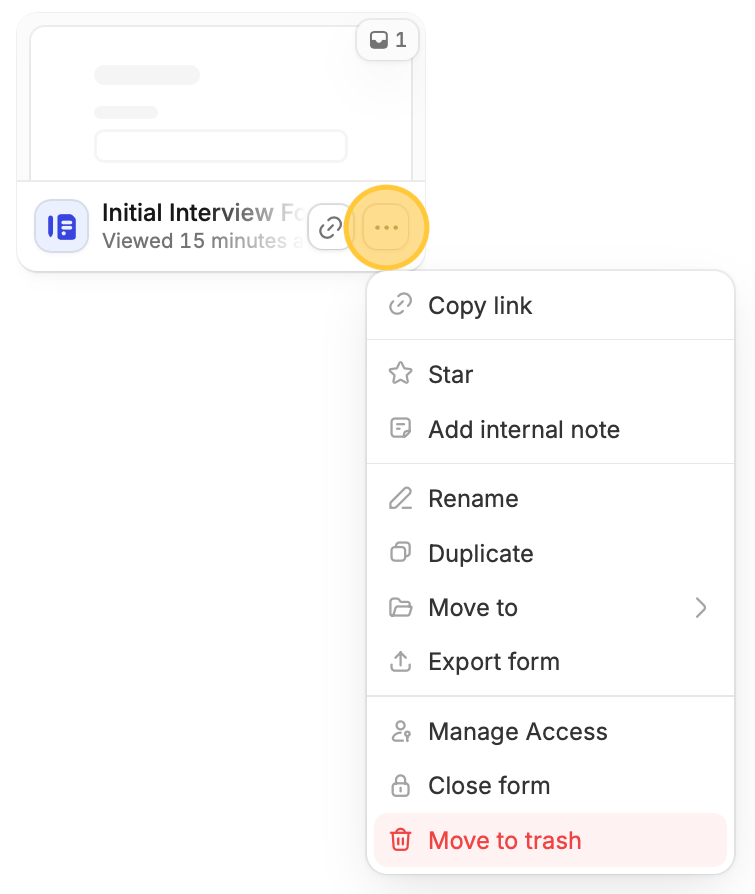
This only moves your form to the Trash. To permanently delete it, remove it from the Trash. Moving a form to the Trash doesn’t delete the files respondents uploaded. They’re deleted when you empty the form from the Trash.
How to restore a form
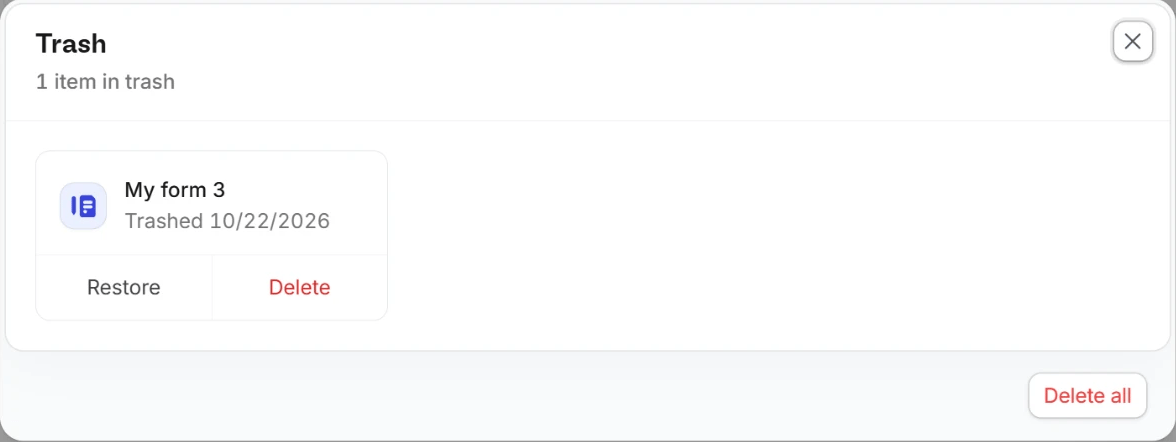
Go toTrash at the bottom of the left sidebar on your dashboard. It only appears when something is in the Trash. The most recently deleted items are listed first. Locate the form you want to recover, then click Restore.
Members with View results only access can’t use the Trash.
How to empty trash
At the bottom of the left sidebar on your dashboard, clickTrash followed by Delete all. This also deletes the files respondents uploaded to those forms.